什么是 Hexo-Douban?

官方文档介绍:一个在 Hexo 页面中嵌入豆瓣个人主页的小插件。


为什么使用 Hexo-Douban?

它可以快捷的根据你在豆瓣上的“书影音游”的数据在Hexo中生成对应的书籍、电影、音乐、游戏等页面,无需你再 hexo new page xxx 了!


如何使用?

在此之前,网上已经有很多关于这个点的教程,重复的内容我就不再多说,这里说一些我配置下来所碰到的不一样的问题。

安装 Hexo-Douban

node 版本要求 >= v18,此处我使用的 hexo-douban 版本是 v2.3.6

1
npm install hexo-douban --save

官方文档配置

配置文件在 _config.yml 中,添加如下内容:

官方文档的精简配置

1
2
3
4
5
6
7
8
9
10
douban:
id: 162448367
book:
title: "This is my book title"
movie:
title: "This is my movie title"
game:
title: "This is my game title"
song:
title: "This is my song title"

官方文档的完整配置

1
2
3
4
5
6
7
8
9
10
11
12
13
14
15
16
17
18
19
20
21
22
23
24
25
26
27
28
29
30
31
32
33
34
35
36
37
38
39
40
41
42
43
44
douban:
id: 162448367
builtin: false
dynamic: false
item_per_page: 10
meta_max_line: 4
customize_layout: page
swup: false
book:
path: books/index.html
title: "This is my book title"
quote: "This is my book quote"
actions:
- do
- wish
- collect
option:
movie:
path: movies/index.html
title: "This is my movie title"
quote: "This is my movie quote"
actions:
- do
- wish
- collect
option:
game:
path: games/index.html
title: "This is my game title"
quote: "This is my game quote"
actions:
- do
- wish
- collect
option:
song:
path: songs/index.html
title: "This is my song title"
quote: "This is my song quote"
actions:
- do
- wish
- collect
option:

自定义配置

这里只拿一个 电影 的配置为例,其他配置类似。

豆瓣ID获取

打开你手机上的豆瓣APP,点击你的头像,进入个人主页,点击左上角的三横杠,点击 设置,进入 资料与设置 页面,点击 豆瓣ID,进入后即可看到你的 豆瓣ID

builtin 配置

builtin: 是否将hexo douban命令默认嵌入进hexo g、 hexo s,使其自动执行hexo douban 命令。默认关闭。

  • 如果你设置为 true,在你执行 hexo g && hexo s 时会自动执行 hexo douban 命令。

  • 如果你设置为 false,你需要动执行 hexo douban 命令。

option 配置

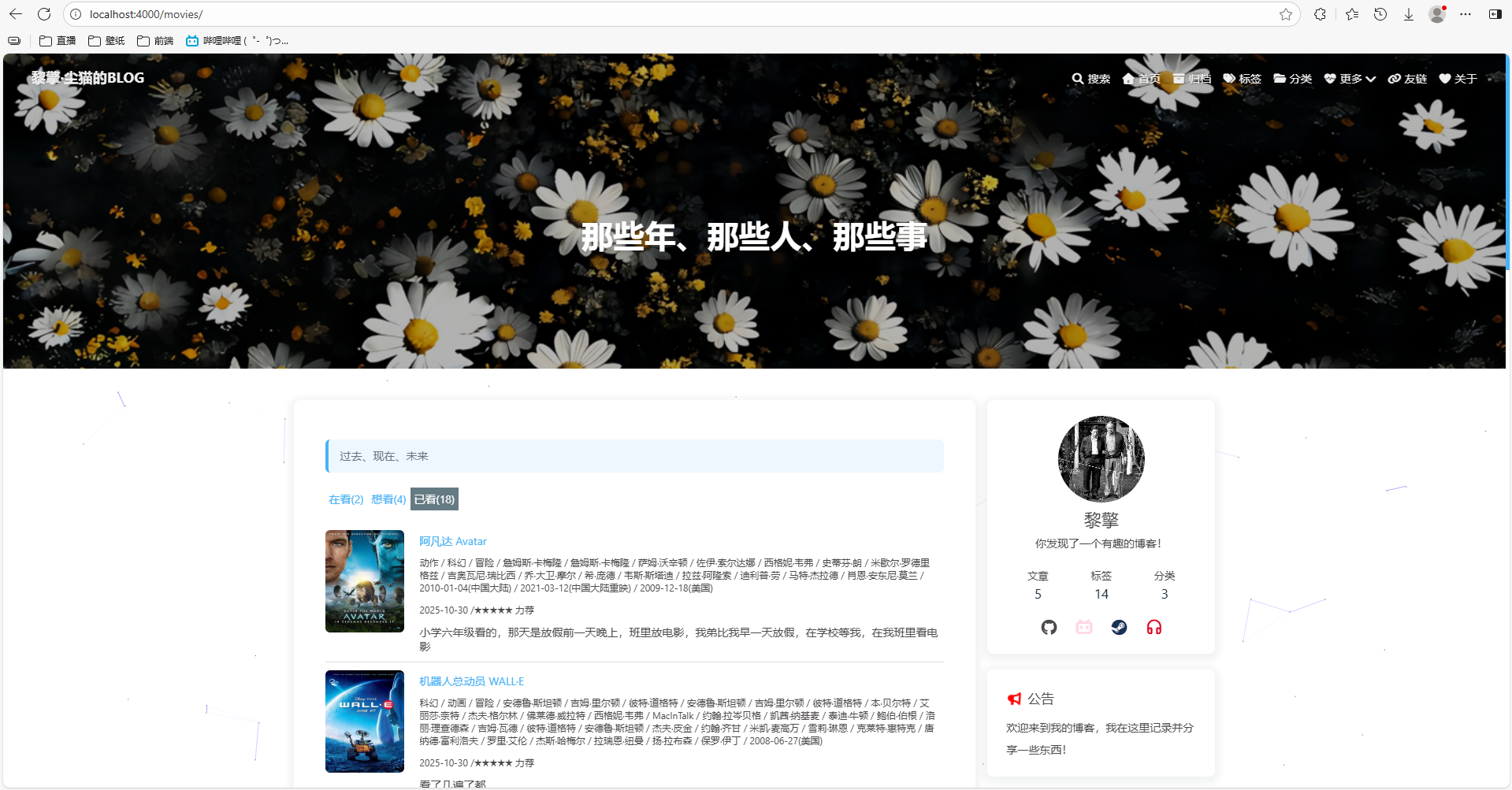
重点在movie 配置中 optionlayout 配置项,默认官方是留空的;但是如果不配置 layouthexo-douban 所生成的电影页面会使用你的博客的首页滚动图片作为顶部背景(top_img),而不是你自定义的 top_img
更谈不上你想设置 title 了。 注意: 这里 titleoption 里的,上方 movie 下的 title 配置项无所谓,我这里没有用到。

1
2
3
4
5
6
7
8
9
10
11
12
movie:
path: movies/index.html
title: '那些年,我追过的电影'
quote: '过去、现在、未来'
actions:
- do
- wish
- collect
option:
layout: page
title: "那些年、那些人、那些事"
top_img: 这里放你自己的图片地址/路径

检验效果

上面这些配置你都配置完了以后,当然,你的 builtin 要配置为 true ,然后你只需要执行 hexo clean && hexo generate && hexo server 就可以生成对应的页面了。

然后访问你的博客,访问 http://localhost:4000/movies/ 就可以看到你的电影页面了。

快去试试吧!
hexoDouban1.png